Managing people, time, and capacity has become one of the biggest challenges for modern project teams. As workloads shift and clients expect faster delivery, businesses are now looking beyond basic planning tools to more intelligent resource management tools that provide clear visibility over their resources. The rise in project resource management platforms reflects this shift, with more organizations investing in real-time allocation, forecasting metrics, and utilization tracking to improve delivery performance.
Statistics show that 12% of projects are rated outright failures, with another 40% delivering mixed outcomes, according to PMI’s “Pulse of the Profession” research. In this environment, effective resource planning becomes critical. This demand for resource-focused platforms is expected to continue to grow through 2026, particularly among agencies, consulting firms, and service delivery teams seeking greater control over capacity and billable hours.
With so many tools available, choosing the right solution can be overwhelming. This review highlights the 10 best resource management tools of 2026, comparing how each supports planning, forecasting, and day-to-day execution for growing teams.
What Defines a High-Performance Resource Management Platform
Before moving into the tools, it is helpful to establish what supports effective project resource management in practical team environments. A strong platform does more than schedule tasks. It helps teams plan with clarity, align capacity with demand, and maintain control over delivery commitments.
Key traits of a high-performing resource management solution include:
- Clear visibility into team utilization so managers can quickly identify who is underloaded, overbooked, or available.
- Accurate forecasting and workload planning that helps prevent resource conflicts before they affect delivery.
- Integration with existing project workflows so teams do not have to change how they operate to adopt the tool.
- Scalable structure for growing teams that keeps the system easy to manage even as more users and projects are added.
- Ease of adoption across different roles so project managers, coordinators, and team members can all use the platform without friction.
| The global Resource Management Software market is currently estimated at around USD 8.09 billion, and is projected to grow with a CAGR of ~8.02% (2025–2032) to reach around USD 15 billion by 2032. |
10 Best Resource Management Software 2026
Find the list of top resource management tools: 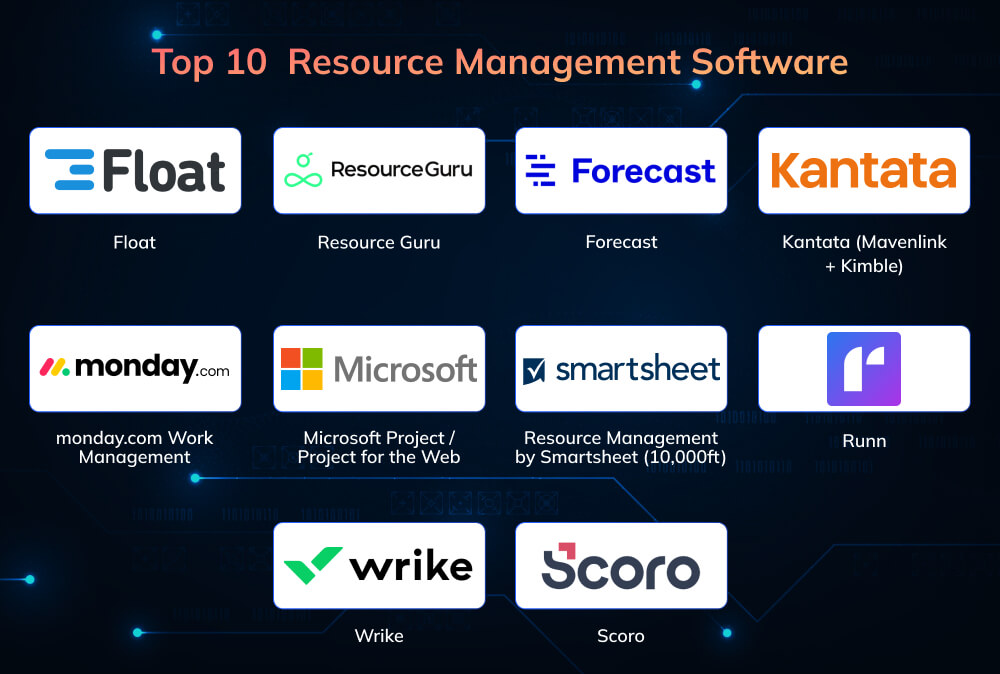
1. Float
Float has become a favorite among creative and digital agencies for its simple, drag-and-drop scheduling interface. It provides a bird’s-eye view of everyone’s workload, making capacity planning incredibly intuitive. Teams appreciate its ability to visualize real-time availability, plan future projects, and handle leave or public holidays seamlessly. Float is ideal for companies that prioritize transparency and agility over complexity.
Key Features:
- Real-time visual scheduling
- Drag-and-drop capacity planner
- Leave and time-off tracking
- Integration with Asana, Jira, Slack, and Trello
- Utilization heatmaps and forecasting dashboards
Pros:
- Fast, lightweight, and intuitive
- Great for small to mid-sized teams
- Quick setup and easy integration
Cons:
- Lacks advanced financial and billing tracking
- Not suited for very large enterprises
- Limited reporting customization
Pricing: The pricing of Float starts at $7 per user/month (billed annually). Plans: Starter: $7/user/month Pro: $12/user/month Enterprise: Custom pricing
| Case Study of Float A global creative agency transitioned from Excel to Float to manage 100+ team members’ availability and assignments. With real-time dashboards and visual planners, project delivery improved without overloading staff, increasing schedule transparency and traceability across departments. |
2. Resource Guru

Resource Guru is a cloud-based scheduling tool built for teams that need to manage people, equipment, and meeting rooms efficiently. It simplifies resource allocation with a clean interface and prevents double-booking through automated conflict alerts. Its simplicity and affordability make it a popular choice among small businesses and startups. It focuses on what matters most visibility and speed in planning.
Key Features:
- Centralized resource scheduling and booking
- Leave and vacation tracking
- Custom resource categories (people, rooms, equipment)
- Reporting and utilization metrics
- API for integrations
Pros:
- Extremely easy to learn and deploy
- Affordable pricing
- Excellent for distributed teams
Cons:
- Limited forecasting and cost tracking
- Minimal automation features
- Not ideal for complex multi-project environments
Pricing: Resource Guru pricing starts at $4.16 per person/month (billed annually).
Plans: Grasshopper: $4.16/person/month Blackbelt: $6.65/person/month Master: $10/person/month
3. Forecast

Forecast is an AI-powered project and resource management platform designed to reduce manual scheduling. It predicts capacity, optimizes workload distribution, and automatically adjusts allocations based on historical data. Its data-driven intelligence helps organizations plan smarter and deliver faster. Best suited for companies managing multiple concurrent projects that need proactive forecasting.
Key Features:
- AI-based auto-allocation engine
- Scenario and “what-if” planning
- Budget, time, and cost tracking
- Integrated project portfolio management
- Advanced reporting and forecasting dashboards
Pros:
- Strong automation and predictive analytics
- Excellent for data-driven organizations
- Reduces time spent on manual scheduling
Cons:
- Steeper learning curve
- Can get pricey for smaller teams
- May require process adaptation for best use
Pricing: Custom pricing only (no public prices).
Plans: Single Tier: Custom pricing (contact sales) Notes: No separate Lite or Pro; all features under one contract-based plan.
4. Kantata (Mavenlink + Kimble)

Kantata unites two powerful PSA solutions Mavenlink and Kimble into one professional services platform. It’s tailored for consulting and service-delivery organizations that need to align people, projects, and profitability. Kantata’s deep analytics, billing automation, and forecasting tools make it a go-to for mature firms seeking operational clarity. It bridges the gap between project delivery and financial outcomes.
Key Features:
- PSA suite covering resource, finance, and billing
- Real-time utilization and margin tracking
- Role-based skill matching
- Advanced forecasting and demand planning
- Integration with Salesforce, Slack, and Jira
Pros:
- Comprehensive visibility from project to profit
- Strong reporting and compliance support
- Ideal for enterprise professional services
Cons:
- Long implementation and onboarding time
- High cost for small businesses
- Complex interface for beginners
Pricing: Enterprise-level, custom pricing only. Notes: Pricing is based on organization size, modules needed, and integrations.
| Case Study on Kantata A multinational consulting firm adopted Kantata to link resource allocation with financial forecasting and profitability. The platform enabled centralized project tracking and margin visibility, supporting their rapid scaling and operational clarity for teams spread across continents. |
5. monday.com Work Management

monday.com is an all-in-one work management platform that extends easily into resource planning. Its visual boards, automation tools, and integrations make team scheduling and task visibility effortless. You can tailor dashboards for workload tracking, project timelines, and capacity forecasts. Perfect for teams wanting flexibility, simplicity, and collaboration.
Key Features:
- Customizable project and workload boards
- Timeline and Gantt chart views
- Automation and notification systems
- Integration with Slack, Teams, and Google Workspace
- Resource allocation widgets and dashboards
Pros:
- Highly visual and beginner-friendly
- Modular and scalable
- Great for hybrid teams
Cons:
- Resource features often require premium plans
- Limited advanced forecasting
- Less ideal for enterprise-grade governance
Pricing: Monday.com pricing is as given below:
- Basic: $9 per seat/month (billed annually)
- Standard: $12 per seat/month
- Pro: $19 per seat/month
- Enterprise: Custom pricing
6. Microsoft Project / Project for the Web
Microsoft Project remains a cornerstone for traditional PMOs and enterprises that depend on structured scheduling. With decades of refinement, it offers powerful resource calendars, cost tracking, and workload management. Teams that invest in proper Microsoft Project training often unlock the full potential of the platform, especially when aligning capacity planning with financial reporting and portfolio visibility. The 2025 web edition adds modern collaboration benefits and seamless integration with Microsoft 365, making it a familiar yet scalable choice for organizations already established within the Microsoft ecosystem.
Key Features:
- Resource pool and calendar management
- Critical path and dependency mapping
- Baselines and earned value analysis
- Integration with Power BI and Teams
- Cost roll-up and time-phased tracking
Pros:
- Comprehensive enterprise-level capabilities
- Trusted by PMOs worldwide
- Excellent integration with Microsoft tools
Cons:
- Steep learning curve
- Lacks agile flexibility
- Complex for non-technical users
Pricing: Microsoft pricing depends on plan:
- Project Plan 1: $10 per user/month
- Project Plan 3: $30 per user/month
- Project Plan 5: $55 per user/month
7. Resource Management by Smartsheet (10,000ft)

Now branded as “Resource Management by Smartsheet,” this tool offers a clean, visual way to plan capacity and utilization. It’s ideal for mid-sized teams that already rely on Smartsheet for project tracking. With real-time dashboards, teams can see who’s overbooked, available, or underutilized at a glance. A perfect blend of simplicity and insight.
Key Features:
- Visual team capacity planner
- Utilization and availability dashboards
- Time tracking and project alignment
- Integration with Smartsheet and MS Teams
- Custom roles and permissions
Pros:
- Great for teams already on Smartsheet
- Balanced usability and analytics
- Strong visualization tools
Cons:
- Performance lags in large datasets
- Some premium features cost extra
- Limited customization for advanced forecasting
Pricing: The Smartsheet pricing varies based on usage:
- Main plans: Pro: $9 per user/month, Business: $19 per user/month (billed annually)
- Resource Management add-on: Price not publicly confirmed for 2026 (contact sales for enterprise add-on)
- Integrated into Smartsheet Enterprise plans for large deployments.
8. Runn
Runn specializes in future-focused resource forecasting for consultancies and digital agencies. Its clean design and “what-if” planning features make it easy to simulate hiring, capacity shifts, or workload changes. Runn’s emphasis on data visualization ensures teams can predict bottlenecks before they happen. Excellent for managers who prefer proactive rather than reactive planning.
Key Features:
- Scenario planning and forecasting
- Role-based resource scheduling
- Real-time utilization tracking
- Costed forecast vs. actual performance
- Integrations with Harvest and Clockify
Pros:
- Intuitive and easy to navigate
- Excellent forecasting capabilities
- Strong visual dashboards
Cons:
- Limited timesheet and billing modules
- Not ideal for heavily regulated sectors
- Fewer enterprise integrations
Pricing: Pricing for runn is also as per your usage:
- Free plan for small teams (up to 5 people)
- Starter: $10 /month
- Professional: $14/month
- Enterprise: Custom pricing
9. Wrike
Wrike is a leading enterprise project management tool that includes strong workload and resource planning features. It’s known for its scalability, customizable dashboards, and role-based permissions. Wrike gives visibility across portfolios, helping teams balance workloads effectively. A smart choice for large organizations managing multiple complex projects.
Key Features:
- Workload view and utilization reports
- Request forms and automation rules
- Real-time dashboards and analytics
- Integrations with Salesforce, Jira, and Google Workspace
- Role-based access and governance
Pros:
- Excellent enterprise scalability
- Deep customization options
- Mature vendor with robust support
Cons:
- Can feel heavy for smaller teams
- Higher tiers needed for full RM features
- Learning curve for new users
Pricing: Wrike pricing has three plans:
- Team: $10 per user/month
- Business: $25 per user/month
- Enterprise & Pinnacle: Custom pricing
| Case Study in Wrike An IT services company used Wrike Resource Management to balance workloads, prevent burnout, and streamline project delivery. Managers leveraged Wrike’s dynamic workload charts to re-prioritize tasks on the fly, ensuring teams worked at sustainable, efficient levels while reducing project delays. |
10. Scoro
Scoro blends project, resource, and financial management into one unified platform. Designed for agencies and service firms, it connects pipeline forecasting with real-time resource allocation and profitability tracking. Its dashboards make it easy to monitor performance from planning to invoicing. Perfect for companies seeking complete operational visibility.
Key Features:
- Resource scheduling and utilization tracking
- Quoting, billing, and budget forecasting
- CRM and project pipeline management
- Profitability and margin reports
- Integration with Xero, QuickBooks, and Jira
Pros:
- Comprehensive business suite
- Excellent financial and utilization reporting
- Seamless visibility across departments
Cons:
- Complex setup for smaller teams
- Dense interface with many menus
- Costly for startups or freelancers
Pricing: Scoro pricing has frour plans:
- Core: $19.90 per user/month
- Growth: $32.90 per user/month
- Performance: $49.90 per user/month
- Enterprise: Custom pricing
| Some sources project a more aggressive trajectory: e.g. a forecasted ~20% CAGR from 2025 to 2032 (from ~$10B in 2025 to ~$30B by 2032) for more advanced or cloud-driven segment. |
A Quick Comparison of Resource Management Tools
| Tool | Best For | Key Features | Pros | Cons | Starting Price (per user/month) |
| Float | Creative & digital agencies | Real-time visual scheduling, drag-and-drop planner, leave tracking, utilization heatmaps | Fast, lightweight, intuitive, easy integration | Lacks billing tracking, limited reporting for enterprises | $7 (Starter Plan) |
| Resource Guru | Small teams & startups | Centralized scheduling, leave tracking, utilization metrics, custom resource categories | Easy to learn, affordable, ideal for distributed teams | Limited forecasting and automation, not for complex projects | $4.16 (Grasshopper Plan) |
| Forecast | Data-driven organizations | AI-based allocation, scenario planning, cost tracking, portfolio management | Predictive analytics, automation, reduces manual scheduling | Steep learning curve, costly for small teams | Custom pricing |
| Kantata | Consulting & professional services | PSA suite, financial management, skill matching, forecasting, Salesforce integration | Full visibility from project to profit, strong reporting | Long onboarding, expensive, complex for beginners | Custom pricing |
| monday.com | Cross-functional and hybrid teams | Visual boards, Gantt charts, automations, integrations with Slack & Teams | Simple, modular, scalable, great collaboration | Advanced forecasting limited to higher tiers | $9 (Basic Plan) |
| Microsoft Project | Enterprises & PMOs | Resource calendars, cost tracking, Power BI integration, critical path mapping | Robust enterprise tool, great reporting, reliable integrations | Complex interface, steep learning curve | $10 (Project Plan 1) |
| Resource Management by Smartsheet | Mid-sized teams using Smartsheet | Visual capacity planner, dashboards, time tracking, MS Teams integration | Simple visuals, great for Smartsheet users, clear utilization data | Lags with large datasets, limited forecasting customization | $9 (Pro Plan) |
| Runn | Agencies & consultancies | Scenario planning, role-based scheduling, forecasting, cost vs. actual tracking | Excellent visualization, intuitive design, forecasting strength | Limited billing, fewer integrations | Free (up to 5 users) / $10 Pro |
| Wrike | Large enterprises & IT teams | Workload view, automation, dashboards, portfolio reporting | Highly scalable, customizable, enterprise-grade | Expensive for small teams, learning curve | $10 (Team Plan) |
| Scoro | Agencies & service firms | Resource scheduling, billing, CRM, profitability tracking | All-in-one business suite, excellent reporting, full visibility | Complex setup, costly for small teams | $19.90 (Core Plan) |
Conclusion
Now, resource planning has shifted from being a simple scheduling exercise to a strategic function that directly influences profitability, delivery quality, and team well-being. The tools reviewed in this guide offer different strengths, but the real value comes when software is paired with strong project leadership and structured resource management practices. Adopting the right platform is a smart move, but building the skills to use it effectively is what truly sets high-performing teams apart.
To help teams move from tool adoption to strategic execution, Invensis Learning offers globally recognized programs such as PMP Certification, PRINCE2 Foundation and Practitioner, Microsoft Project Training, and Project Management Fundamentals, all designed to strengthen planning, scheduling, and delivery capabilities. These certifications not only improve decision-making around capacity and utilization but also ensure that your chosen software integrates smoothly into your project workflows.
If you are looking to improve how your organization manages people, time, and delivery commitments, now is the right moment to combine the power of project resource management software with proven training. Explore the Project Management Certification Courses at Invensis Learning and give your team the confidence to plan smarter, allocate better, and deliver with consistency.